Getting a clear picture of your site takes too much work
Stockpile measurements, survey files, and material records often sit in different places. Bringing them together for inventory reviews and daily planning means chasing information, checking figures, and preparing reports.
Measurements from different dates
Stockpiles surveyed at different times make it harder to assemble a consistent picture of the site.
Survey data stays with specialists
Operations teams may need to request screenshots, measurements, or reports before they can review a work area.
Unclear volume references
Changes to a stockpile boundary or base surface can make one measurement difficult to compare with the next.
Repeated report preparation
Inventory reviews and contractor discussions require teams to bring quantities and supporting survey records together.
Material changes are hard to explain
A total volume alone does not show where material was added or removed between surveys.
Make the survey date, measured area, and volume reference clear to everyone using the results.
Compare stockpiles and work areas over time
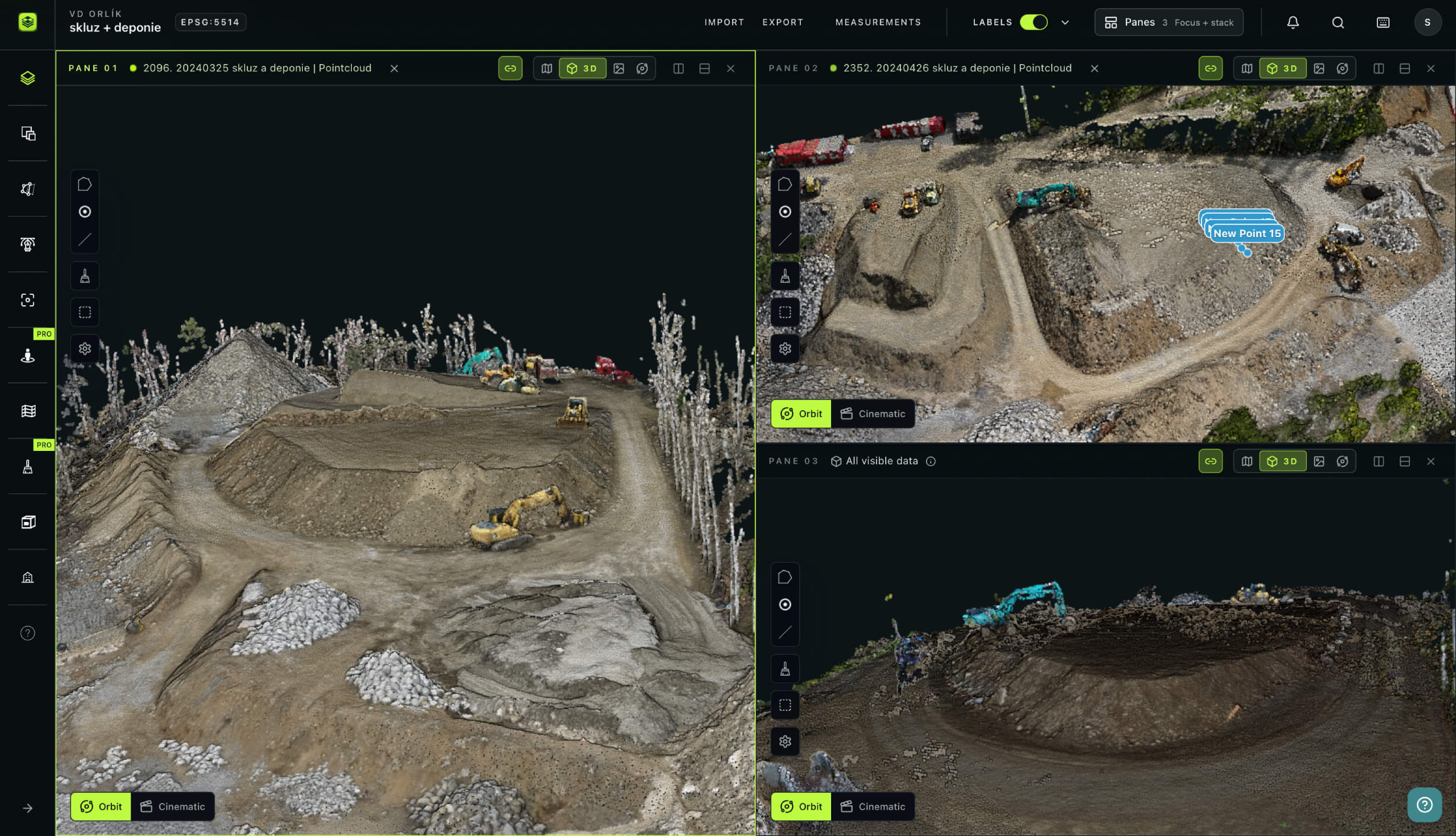
Open surveys from different dates in separate panes to review stockpile changes, pit progression, or captured conditions before and after a blast.
Keep a top-down map beside a 3D view and link pane cameras to coordinate your inspection. Layer names, dates, and identifiers help you check which surveys you are comparing.
www.avagpro.com
www.avagpro.com

Calculate volumes against a clear reference
Draw a polygon around a stockpile or work zone. Calculate its volume against a selected base surface, or compare two elevation datasets to measure surface changes within the same boundary.
Generate a 2D cut/fill map to see where the surfaces differ. Review the selected layers, boundary, and calculation method, then export a PDF measurement report to support quantity discussions.
Inspect the terrain and share your observations
Explore Terrain with elevation coloring and contours. Draw lines or arcs to generate profiles and cross-sections through the areas you want to examine.
Use clipboxes to focus on specific areas of suitable 3D data, and add Notes at locations that need discussion. Give colleagues appropriate project access so they can review the available surveys and findings in their browser.
www.avagpro.com

Mining
How AVAG helps mining and quarry teams
Bring survey comparisons, volume calculations, and site observations together. Give operations and commercial teams access to the data behind stockpile quantities and material changes.
See how STRABAG uses AVAG on a highway project to calculate depot capacity, check fill levels, and plan surplus material movements.
of highway construction supported by survey-based material planning

Your new workflow
Monday 9am
Monday 11am
Monday 2pm
Monday 3pm
Monday 4pm
Result
Stockpile quantities and surveyed changes are available with their supporting data.
Use the record to inform inventory reviews, material planning, and contractor discussions.
Benefits
Why mining teams choose AVAG
Stockpile volume calculations
Measure quantities within defined boundaries and against a chosen reference.
Clear calculation context
Check the datasets, boundaries, and reference surfaces behind the results.
Survey comparisons
Review captured changes across different dates.
Shared project access
Give operations and commercial teams access without additional per-seat fees.
Terrain analysis
Explore elevations, contours, profiles, and cross-sections.
Supporting reports
Prepare PDF measurement reports for quantity reviews and project documentation.
Trusted by market leaders
Start your free trial
14 days • 200 GB storage • No credit card required
Bring in a survey, measure a stockpile, and explore how to share the results with your team.

Solutions
Frequently asked questions
How does AVAG calculate stockpile volumes?
Draw a polygon around the stockpile and choose a reference for the calculation. With one elevation dataset, you can calculate volume against a selected base surface. With two suitable elevation datasets, you can calculate the difference between their surfaces within the boundary. Check that the boundary, surface data, and reference method are appropriate for the stockpile being measured.
Can I compare stockpiles or pit conditions across survey dates?
Yes. Use separate panes to review surveys side by side, or compare suitable elevation surfaces to calculate changes within a defined area. You can also generate a 2D cut/fill map to inspect where the surfaces differ. Meaningful comparisons depend on compatible positioning, coverage, and survey quality.
Can we use data processed in another application?
Yes. AVAG accepts supported processed outputs, including TIFF orthophotos and DSMs, LAS/LAZ point clouds, and supported mesh packages. You can retain your existing processing workflow and use AVAG for viewing, analysis, reporting, and sharing. Check the format requirements before importing.
How accurate are the volume calculations?
Accuracy depends on the captured data, survey control, surface quality, measurement boundary, and chosen reference. Use capture and processing methods suited to your project’s tolerances. Consistent survey methods and calculation settings help make stockpile measurements comparable over time.
Can AVAG compare survey data with a mine design surface?
Yes. Import a LandXML design surface and review it alongside the surveyed surface. With suitable elevation data, you can calculate surface differences within a selected boundary. DXF drawings can also provide visual design context.
Can we compare surveys from before and after a blast?
Yes. You can review suitable pre- and post-blast surveys side by side and calculate differences between captured elevation surfaces. This supports documentation of surveyed changes. It does not automatically assess blast performance, fragmentation, or geotechnical safety.
Can AVAG work as a shared portal for our teams and contractors?
Yes. Invite operations staff, surveyors, commercial teams, and contractors with appropriate access rights. They can review the available surveys, measurements, and Notes in their browser. AVAG supports unlimited users without additional per-seat fees, while access rights control which project data each person can see.
What is MapClean, and how does it help on mine sites?
MapClean helps clean up survey surfaces where vehicles, machinery, or other temporary objects affect the area you want to measure. Complete the necessary cleanup before calculating final volumes, then review the edited surface and calculation inputs. This helps reduce the influence of temporary objects on quantity measurements.
Can I isolate and export part of a point cloud?
You can position and rotate a clipbox to focus the visible point cloud on a particular area. The clipbox changes the view without modifying the source file. Direct export of a clipped subset is not currently available; contact support to discuss arranging a cropped point-cloud export.